LinkedIn Connection Request Message Examples (12 Templates)
October 16, 2025 · 5 min read · by Ahmet Faruk Yilmaz, Founder of Asphia
TL;DR
Effective LinkedIn connection request messages are short (under 50 words), reference something specific about the recipient, and make the ask feel low-pressure. Relevant personalization may improve acceptance; test it against your audience baseline. Skip the pitch in the first message. These 12 templates cover common B2B sales and recruiting scenarios.
The best LinkedIn connection request messages are short, specific, and make the ask feel obvious. Under 50 words, one clear reason to connect, no pitch. That is the whole formula.
Here is how to adapt your own note, plus 12 example templates. Use a template only when every statement is true and you can point to the underlying source; do not imply a conversation, recommendation, shared event, or company fact that did not happen.
Why Most Connection Requests Get Ignored
Generic messages fail for one reason: they look like broadcasts. When someone reads “Hi, I’d like to add you to my professional network” (LinkedIn’s default) or a templated opener that could apply to anyone, they assume you sent it to five hundred people that morning. Because you probably did.
The fix is not clever wordsmithing. It is specificity. One real detail (a post they wrote, a role change, a company you both know) signals that you actually looked at their profile. That changes the calculus from “this is spam” to “this person noticed something.”
The other common mistake is pitching in the connection note. LinkedIn connection requests are not cold emails. The note exists to explain why you want to connect, not to sell. Save the ask for after they accept.
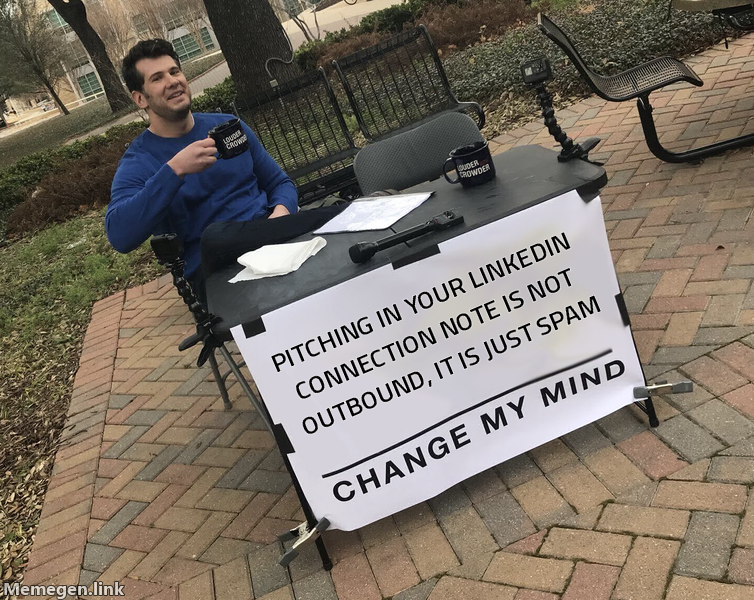 The note gets you connected. The pitch comes after they accept, not during.
The Structure of a High-Acceptance Request
Every effective connection request message has three parts, each optional depending on context:
Hook: one specific observation. A post they wrote, a company milestone, a mutual connection, a podcast they appeared on. Something that proves you saw them specifically.
Bridge: one sentence connecting that observation to why it makes sense for you to connect. Keep it about them, not about you.
Ask: low-pressure and obvious. “Would love to connect” or “happy to be in each other’s networks” works. No question marks, no calls to action, no requests for a call.
12 LinkedIn Connection Request Templates
After reading their content
-
“Saw your post on [topic]. Your point about [specific detail] is something I have been thinking about too. Would love to be connected.”
-
“Your piece on [topic] came up in our team standup this week. Great perspective. Happy to connect.”
Use this only if the discussion actually happened. Otherwise, replace it with a verified public detail from the piece.
Mutual connection or event
- “We have [mutual connection name] in common. They mentioned you when we talked about [relevant topic]. Would love to connect.”
Use this only if the mutual contact actually made that introduction or recommendation. Otherwise, reference a verified public detail instead.
- “Saw you were at [event name]. Did not get a chance to say hello there. Happy to be connected here.”
Shared role or industry context
-
“I also work in [industry/function]. I follow a few people in this space closely and your work keeps coming up. Worth connecting.”
-
“Running outbound for [company type] too. Always good to know others doing the same. Happy to connect.”
Referencing a company signal
-
“Noticed [their company] just [opened a London office / launched X / raised a round]. Congrats. Would love to be connected.”
-
“Your team seems to be doing interesting work on [topic]. Following along and would love to connect.”
Direct and honest
-
“I reach out to [their role] professionals as part of my work. Figured being connected here is a better starting point than a cold email. Happy to connect either way.”
-
“I will be honest: I think what we do at [your company] could be relevant to you. No pitch here, just want to be connected first.”
Recruiting context
-
“I work with [role] professionals who are open to the right opportunity. Not assuming anything about your situation, just expanding my network in this space.”
-
“I recruit in the [industry] space. Your background caught my attention. Would love to be connected even if the timing is not right.”
How to Personalize These at Scale
Personalization at scale is not manual. The approach that works is building a signal layer first, then generating the hook from that signal.
For example: pull a list of prospects from Apollo or Clay, filter by those who have posted on LinkedIn in the last 30 days, and use the post content as the input for a templated hook. The result is a personalized-feeling message for each person that took seconds to produce per lead.
This is the same pattern used in signal-based cold email and it transfers directly to LinkedIn. The mechanic is: find a real signal, use that signal as the personalization hook, keep the rest of the message structurally identical.
If you are running LinkedIn outreach at volume alongside cold email, it helps to have both channels pulling from the same data and the same ICP definition. Running them separately creates inconsistency in messaging and wastes enrichment spend. Our managed outbound service handles both from a single data layer.
What to Do After They Accept
The connection request is not the campaign. It is the first gate.
Once someone accepts, you have a warm signal. They looked at your profile and decided to let you in. That is worth something. The mistake is waiting too long or hitting them immediately with a pitch.
A good follow-up after acceptance: one or two sentences referencing why you connected, and a single soft ask. Not “can we book 30 minutes?” but “happy to share more if it is ever relevant” or “let me know if you want to compare notes sometime.”
The goal of LinkedIn outreach at this stage is to move from stranger to known quantity. The meeting comes later.
For teams running LinkedIn outreach alongside cold email as a coordinated sequence, the economics improve significantly when both channels reinforce each other. Same person, same message angle, two touchpoints instead of one.
Keep the connection note short. Keep it specific. Do not pitch. The templates above give you the raw material. The personalization is what turns them into results.
Request the signal tier list.
A practical view of how we rank observable signals before outreach. We review each request for fit and may reply by email; delivery is not automatic.
By submitting, you agree to processing described in our Privacy Policy.
Your request was submitted. If it is a fit, we may follow up by email.
One more step: send the prepared request to faruk@asphia.consulting
FAQ
How long should a LinkedIn connection request message be?
Keep it concise and within LinkedIn's 300-character cap. A context sentence and a reason can be a useful starting format, but compare lengths against a qualified audience baseline instead of assuming shorter messages will be accepted more often.
Should I include a pitch in my LinkedIn connection request?
Treat the connection note as context rather than a full pitch. A low-pressure reason to connect may be easier to evaluate, but test the format with your audience and avoid claiming that pitching will always be ignored.
What is the LinkedIn connection request character limit?
LinkedIn allows up to 300 characters in a connection request note. Treat that as a ceiling, not a target; the useful length depends on context and audience, so compare concise variants against a baseline.
Do LinkedIn connection requests get accepted more if they are personalized?
Relevant personalization may improve acceptance, but results vary by audience and account. Reference a specific post the person wrote, a mutual connection, a recent company milestone, or a shared professional interest, then compare with a generic-note baseline.
How many LinkedIn connection requests can I send per week?
LinkedIn enforces informal limits, and accounts that send too many requests too fast can get restricted. No weekly volume guarantees account safety; figures such as 100 per week are planning references only. Follow current platform rules, account conditions and observed signals.
What is the difference between a LinkedIn connection request and an InMail?
A connection request is free and goes to 1st-degree connections or anyone in your network who allows open connection requests. InMail is a paid LinkedIn feature that lets you message people outside your network directly. Connection requests with a note tend to feel less intrusive than InMails when personalized well.

Ahmet Faruk Yilmaz
Founder of Asphia. He builds and runs signal-based B2B outbound engines for lean teams, and writes about cold email, Clay, deliverability, and GTM engineering.
Want this run for you?
Explore our B2B outbound and GTM engineering services, then request the planning framework to scope your next campaign.
Request the planning framework →